Everything Intravo does, in one place. The features you'd expect from any interpretation platform — and the ones only Intravo has, marked so you can tell them apart.
Meetings delivered in 40+ countries · 60 languages
Actual product screens with demo data. Interface shown in English.Actual product screens with demo data. Interface shown in English.
Intravo Aware
AI that knows your meeting — and gets better while it runs.
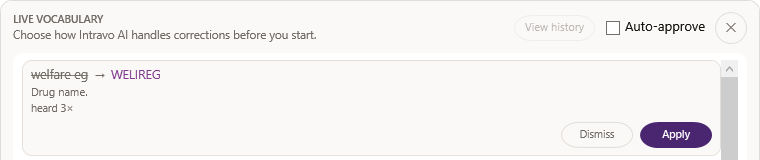
AI reads your decks before anyone speaks, automatically proposes terminology corrections for review and reports how the meeting performed.
Aware AI Learn · live suggestionAutomatic review every 10 minutes
Stage · 00:31:12
“Patients will start peg fill grass tim on day two.”
pegfilgrastimheard 3× · evidence attachedApprove
Your deck · slide 14
Aware AI Preload · before Start
WELIREGPegfilgrastimProtocol IDsSpeaker names
The Honest ReportDelay behind speaker
ES5.1 s
FR3.6 s
ZH6.2 s
AR4.6 s
Every number measured12 s target
Speaker Sense · “As the lead investigator, I’ll start with safety.”
Adaptive PaceEspañol catching up → level
Aware AI Preload Only Intravo
Reads your decks first. Drugs, protocols and people are known before Start.
Aware AI Learn Only Intravo
Automatically reviews recent speech for possible misheard terms. Review the evidence and approve a correction for the next speech pause.
The Honest Report Only Intravo
Delay per language, fixes made in flight, run-by-run totals. HTML + CSV.
Speaker Sense Only Intravo
The report names who spoke and quotes the line that proves it.
Adaptive Pace Only Intravo
A language that falls behind speeds up gently until it’s level.
Custom vocabulary Intravo depth
Built for your company by our team, complimentary. Forced only where the AI would slip.
Custom glossary Included
Add or edit your own terms anytime in the portal.
You stay in control
Nothing changes behind anyone’s back. Every fix waits for your approval.
Intravo Aware AI assistance
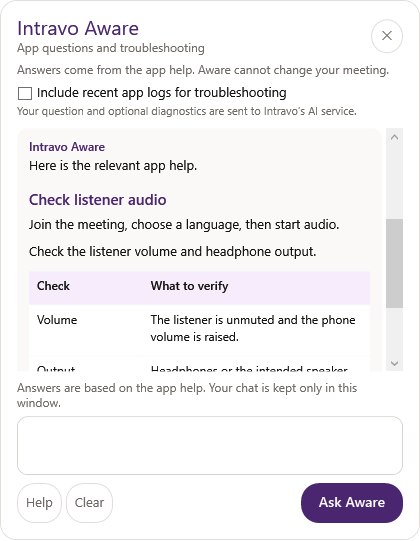
AI help that knows the app. Troubleshooting that uses your logs.
Ask Aware a setup question right inside the app. When something needs investigating, choose to include recent app logs so AI can surface relevant diagnostic messages alongside the app's help.
Aware AI HelpChat about setup, audio routing and app features. Aware finds relevant guidance from the app's help, with links to the source topics.
Aware AI TroubleshootingOptionally include filtered recent operational logs and connection status. Aware can highlight relevant diagnostic messages and ask focused follow-up questions.
Log sharing is off by default. Shared excerpts exclude recognized speech and credentials. Diagnostic sharing is unavailable in BAA/no-store mode. You stay in control of meeting changes.
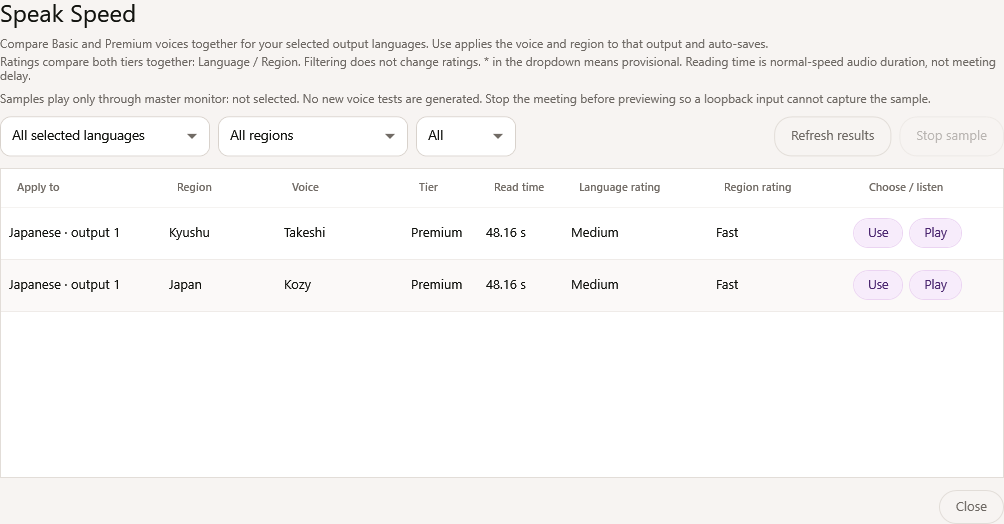
Change the voice mid-meeting. Set speaking speed per language.
Multilingual speakers Included
Languages detected automatically. Same-language speech passes straight through.
In the room
Built for the room your AV crew already runs.
Captions on the big screen, a channel per language into the headsets, and breaks that never go silent.
Live captions · EspañolGracias a todos por venir esta noche.El presupuesto escolar se votará en marzo
Scan to listen60 languages · no app
Projector caption screen
Room feed AV desk
Intravo for Windows
Out 1 · Español
Out 2 · Français
Floor · Original
Headset receivers
Smart Break
Interpretation and its cost: pausedRoom audio: flowing to every channel
Radio check-out kiosk31 languages
Which language do you need?¿Qué idioma necesita?De quelle langue avez-vous besoin ?您需要哪种语言?
EspañolFrançais普通话
Badge scanned · Canal 3 · signed
Projector captions Only Intravo
Full-screen live captions with a join QR on the room screen.
Output per language Only Intravo
A separate audio output per language into receivers and radios.
Floor audio Only Intravo
Original room sound as its own output, and opt-in on phones.
Smart Break Only Intravo
One button stops interpretation and its cost. Room audio keeps flowing.
Auto-Level Only Intravo
One volume for every language, interpreter and the break.
Room and virtual questions Included
House microphones feed the enabled languages. Virtual speakers and questions can enter through system audio and Intravo's virtual platform.
Monitor any channel Only Intravo
Take the AV desk or any audio interface; listen to any language, live.
Radio check-out kiosk Only Intravo
In their own language, by badge or name. See who took which channel.
Listen anywhere
Every seat, every screen, every network.
Apps, a phone browser, your website, your webcast or a headset. Your audience picks — nobody waits.
EspañolHoy hablamos del nuevo plan.
iPhone app
PortuguêsHoje falamos do novo plano.
Android app
intravo.com/listen
Pick your languageDeutschItalianoPolskiListen · no install
Mobile web
Intravo playerDeutsch ▾Live
Your website
ES · CCBreakout 2
Connex webcast
CH 3Español
Headset receivers
Always-On AudioIf a path is blocked, the next takes over. Nobody hears silence.
Path 1BlockedPath 2BlockedPath 3BlockedPath 4Live
iPhone, Android & web Included
Code or QR. Lock-screen audio, widgets, iPhone Live Activity.
Always-On Audio Only Intravo
Four paths. Proven on a network that blocked three of them.
Live captions Included
Pushed as they’re spoken, in four layouts. Switch language anytime.
Website & webcast Only Intravo
One line of script embeds the player. Or listen inside Connex, breakouts too.
Human + AI
Your interpreter takes a breath. The AI takes the sentence.
Mix AI and human interpreters language by language, with the AI listening underneath so nothing drops.
Interpreter booth · FrançaisOn airWeb page · no install
Stage transcript · newest first“Our second quarter closed ahead of plan.”“Let’s begin with the numbers.”
RosterClaire · on airMarc · standing byChatTake over at the Q&A?Ready when you are.
Hand off to MarcAcceptDeclineRoom video · Standard
EspañolAIpremium voice
FrançaisHumanbooth on air
普通话Human + AI Safety Net
AI Safety Net Only
AI, human, or human with AI underneath.
Web booth Included
Handoff, chat, roster, transcript, room video.
Independent booths Only
Open early for preflight. No idle billing.
Partner interpreters Included
We staff your meeting, any major language.
Thousands of professional interpreters across every major language. We staff your meeting.
One professional setup. Voices from the room and online.
Bring the meeting audio into Intravo from the source that suits the event. Use house microphones for in-room questions, system audio for virtual speakers, or a network programme feed from your production team.
House microphones for the room
A handheld, lectern or panel microphone lets the AV team manage levels and speaking turns. A close microphone helps separate the voice from room noise; the house mixer sends that feed to both the room sound system and interpretation. Audience questions need no attendee app.
Presenter or Q&A mic → house mixer → audio interface → Intravo
Virtual questions are welcome
Remote speakers and audience questions on Intravo's virtual platform can enter interpretation through system audio. The platform manages who speaks; Intravo captures the selected computer playback feed and interprets that audio for the enabled languages.
Choose built-in NDI reception or a network feed using RTMP/RTMPS, SRT, RTSP or HTTP/HLS. The programme audio can supply interpretation alongside the picture. Microphone and system-audio input remain available source choices.
NDI or network programme → selected source audio → Intravo
Send each language where it belongs.
People and headsetsBrowser and QR listening, the webcast player, and physical audio outputs for venue listening equipment.
NDI broadcastPublish composed programme video with selected floor or language audio and optional captions.
External streamsRTMP/RTMPS and SRT outputs with selected audio and captions. Separate RTMP destinations can carry different languages.
Google Cast / ChromecastChoose a subtitle language or an enabled NDI output's composed video/audio separately for compatible TVs.
Choose the interpretation source for each meeting; combine speakers in the venue mixer or virtual platform. Test the audio route and destination before the event. Google Cast needs compatible devices and network access; video casting adds delay and screens are not synchronized. Microphone placement and feedback guidance.
Video & streaming
Send the picture out — in any language.
Capture, caption and stream from the same app. Each destination carries the audio you choose.
StreamingBurned in · EspañolBienvenidos. Empezamos en un minuto
Program picture + audio
RTMP · destination 1Floor audio
SRT · destination 2Español
RTMPS · destination 3Français
Stream out, per language Included
RTMP, RTMPS or SRT, each with floor audio or one language.
Capture & encode Included
Screen, window, region or camera, with hardware encoding.
Program picture in Included
Receive picture and source audio from RTMP/RTMPS, SRT, RTSP, HTTP/HLS or NDI.
Captions on video Included
Overlay captions or burn one language into the picture.
Reports, recordings & data
A report you’ll forward. Recordings that stay home.
Measured numbers for the sponsor, files for your team, and your recordings on your own machine.
Meeting report
The Honest ReportQuarterly town hall · 2 runs · 4 languages


 Intravo for Windows